
apideck.com – vault
Welcome to the Vault API 👋
When you're looking to connect to an API, the first step is authentication.
Vault helps you handle OAuth flows, store API keys, and refresh access tokens from users (called consumers in Apideck).
Base URL
The base URL for all API requests is https://unify.apideck.com
Get Started
To use the Apideck APIs, you need to sign up for free at https://app.apideck.com/signup [blocked]. Follow the steps below to get started.
- Go to the .
- Get your API key and the application ID.
- Select and configure the integrations you want to make available to your users. Through the Unify dashboard, you can configure which connectors you want to support as integrations.
- Retrieve the client_id and client_secret for the integration you want to activate (Only needed for OAuth integrations).
- Soon, you can skip the previous step and use the Apideck sandbox credentials to get you started instead (upcoming)
- Register the redirect URI for the example app () in the list of redirect URIs under your app's settings
- Use the to get your integration listed across app marketplaces.
Hosted Vault
Hosted Vault (vault.apideck.com) is a no-code solution, so you don't need to build your own UI to handle the integration settings and authentication.

Behind the scenes, Hosted Vault implements the Vault API endpoints and handles the following features for your customers:
- Add a connection
- Handle the OAuth flow
- Configure connection settings per integration
- Manage connections
- Discover and propose integration options
- Search for integrations (upcoming)
- Give integration suggestions based on provided metadata (email or website) when creating the session (upcoming)
To use Hosted Vault, you will need to first . This can be achieved by making a POST request to the Vault API to create a valid session for a user, hereafter referred to as the consumer ID.
Example using curl:
Vault API
Beware, this is strategy takes more time to implement in comparison to Hosted Vault.
If you are building your integration settings UI manually, you can call the Vault API directly.
The Vault API is for those who want to completely white label the in-app integrations overview and authentication experience. All the available endpoints are listed below.
Through the API, your customers authenticate directly in your app, where Vault will still take care of redirecting to the auth provider and back to your app.
If you're already storing access tokens, we will help you migrate through our Vault Migration API (upcoming).
Domain model
At its core, a domain model creates a web of interconnected entities.
Our domain model contains five main entity types: Consumer (user, account, team, machine), Application, Connector, Integration, and Connection.
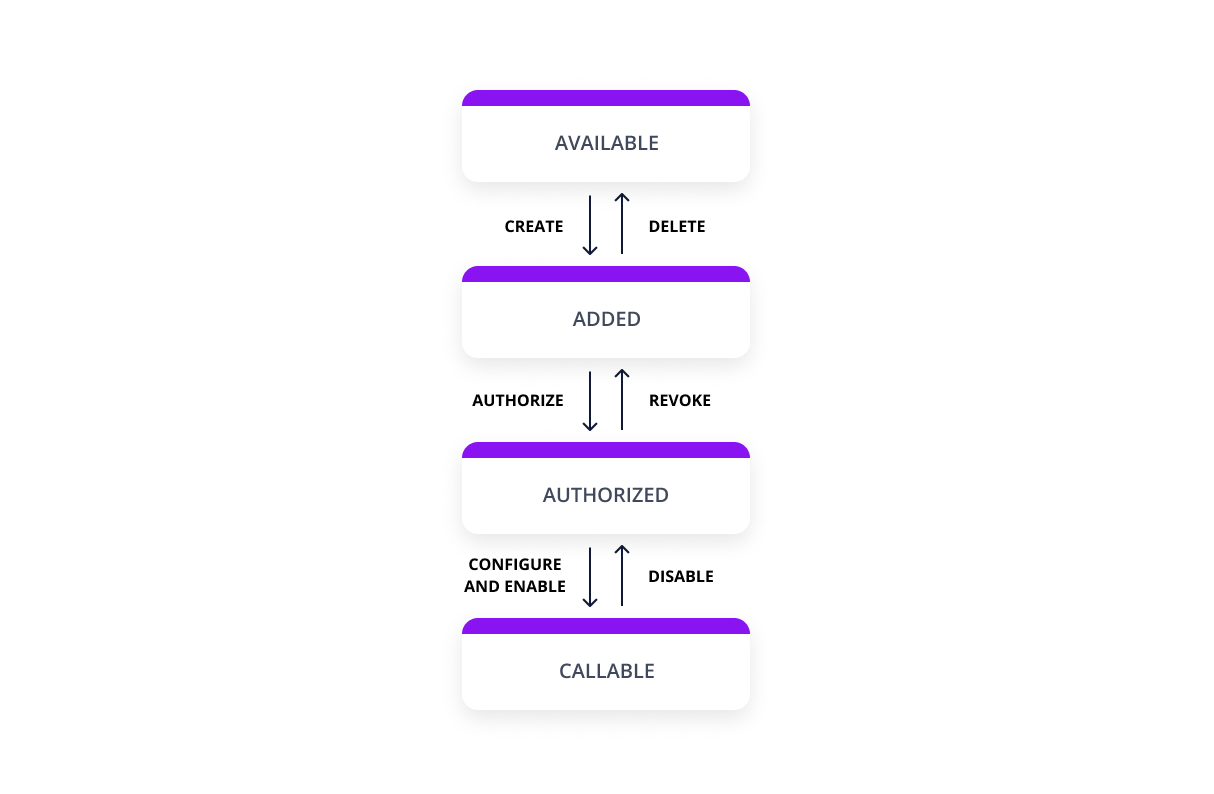
Connection state
The connection state is computed based on the connection flow below.
Unify and Proxy integration
The only thing you need to use the Unify APIs and Proxy is the consumer id; thereafter, Vault will do the look-up in the background to handle the token injection before performing the API call(s).
Headers
Custom headers that are expected as part of the request. Note that states header names are case insensitive.
Sandbox (upcoming)
The sandbox is pre-loaded with data similar to a real-life integrations setup. You can use the preconfigured OAauth configured connectors for testing purposes and can skip this step by using the Apideck sandbox credentials to get you started.
Guides
- How to configure the OAuth credentials for integration providers (COMING SOON)
FAQ
What purpose does Vault serve? Can I just handle the authentication and access token myself? You can store everything yourself, but that defeats the purpose of using Apideck Unify. Handling tokens for multiple providers can quickly become very complex.
Is my data secure?
Vault employs data minimization, therefore only requesting the minimum amount of scopes needed to perform an API request.
How do I migrate existing data?
Using our migration API, you can migrate the access tokens and accounts to Apideck Vault. (COMING SOON)
Can I use Vault in combination with existing integrations?
Yes, you can. The flexibility of Unify allows you to quickly the use cases you need while keeping a gradual migration path based on your timeline and requirements.
How does Vault work for Apideck Ecosystem customers?
Once logged in, pick your ecosystem; on the left-hand side of the screen, you'll have the option to create an application underneath the Unify section.
How to integrate Apideck Vault
This section covers everything you need to know to authenticate your customers through Vault. Vault provides three auth strategies to use API tokens from your customers:
- Vault API
- Hosted Vault
- Apideck Ecosystem (COMING SOON)
You can also opt to bypass Vault and still take care of authentication flows yourself. Make sure to put the right safeguards in place to protect your customers' tokens and other sensitive data.
What auth types does Vault support?
What auth strategies does Vault handle? We currently support three flows so your customers can activate an integration.
API keys
For Services supporting the API key strategy, you can use Hosted Vault will need to provide an in-app form where users can configure their API keys provided by the integration service.
OAuth 2.0
Authorization Code Grant Type Flow
Vault handles the complete Authorization Code Grant Type Flow for you. This flow only supports browser-based (passive) authentication because most identity providers don't allow entering a username and password to be entered into applications that they don't own.
Certain connectors require an OAuth redirect authentication flow, where the end-user is redirected to the provider's website or mobile app to authenticate.
This is being handled by the /authorize endpoint.
Basic auth
Basic authentication is a simple authentication scheme built into the HTTP protocol. The required fields to complete basic auth are handled by Hosted Vault or by updating the connection through the Vault API below.
curl -X POST https://unify.apideck.com/vault/sessions -H "Content-Type: application/json" -H "Authorization: Bearer <your-api-key>" -H "X-APIDECK-CONSUMER-ID: <consumer-id>" -H "X-APIDECK-APP-ID: <application-id>" -d '{"consumer_metadata": { "account_name" : "Sample", "user_name": "Sand Box", "email": "sand@box.com", "image": "https://unavatar.now.sh/jake" }, "theme": { "vault_name": "Intercom", "primary_color": "#286efa", "sidepanel_background_color": "#286efa","sidepanel_text_color": "#FFFFFF", "favicon": "https://res.cloudinary.com/apideck/icons/intercom" }}'- Homepage
- https://api.apis.guru/v2/specs/apideck.com:vault/9.3.0.json
- Provider
- apideck.com:vault / vault
- OpenAPI version
- 3.0.3
- Spec (JSON)
- https://api.apis.guru/v2/specs/apideck.com/vault/9.3.0/openapi.json
- Spec (YAML)
- https://api.apis.guru/v2/specs/apideck.com/vault/9.3.0/openapi.yaml
Tools (22)
Extracted live via the executor SDK.
-
connections.connectionsAddCreate an authorized connection
-
connections.connectionsAllThis endpoint includes all the configured integrations and contains the required assets to build an integrations page where your users can install integrations. OAuth2 supported integrations will contain authorize and revoke links to handle the authentication flows.
-
connections.connectionsAuthorizeIn most cases the authorize link is provided in the
/connectionsendpoint. Normally you don't need to manually generate these links.Use this endpoint to authenticate a user with a connector. It will return a 301 redirect to the downstream connector endpoints.
Auth links will have a state parameter included to verify the validity of the request. This is the url your users will use to activate OAuth supported integration providers.
Vault handles the complete Authorization Code Grant Type Flow for you and will redirect you to the dynamic redirect uri you have appended to the url in case this is missing the default redirect uri you have configured for your Unify application.
-
connections.connectionsCallbackThis endpoint gets called after the triggering the authorize flow.
Callback links need a state and code parameter to verify the validity of the request.
-
connections.connectionsDeleteDeletes a connection
-
connections.connectionSettingsAllThis endpoint returns custom settings and their defaults required by connection for a given resource.
-
connections.connectionSettingsUpdateUpdate default values for a connection's resource settings
-
connections.connectionsImportImport an authorized connection.
-
connections.connectionsOneGet a connection
-
connections.connectionsRevokeIn most cases the authorize link is provided in the
/connectionsendpoint. Normally you don't need to manually generate these links.Use this endpoint to revoke an existing OAuth connector.
Auth links will have a state parameter included to verify the validity of the request. This is the url your users will use to activate OAuth supported integration providers.
Vault handles the complete revoke flow for you and will redirect you to the dynamic redirect uri you have appended to the url in case this is missing the default redirect uri you have configured for your Unify application.
-
connections.connectionsTokenGet an access token for a connection and store it in Vault. Currently only supported for connections with the client_credentials OAuth grant type.
Note that the access token will not be returned in the response. A 200 response code indicates a valid access token was stored on the connection.
-
connections.connectionsUpdateUpdate a connection
-
consumers.consumerRequestCountsAllGet consumer request counts within a given datetime range.
-
consumers.consumersAddCreate a consumer
-
consumers.consumersAllThis endpoint includes all application consumers, along with an aggregated count of requests made.
-
consumers.consumersDeleteDelete consumer and all their connections, including credentials.
-
consumers.consumersOneConsumer detail including their aggregated counts with the connections they have authorized.
-
consumers.consumersUpdateUpdate consumer metadata such as name and email.
-
logs.logsAllThis endpoint includes all consumer request logs.
-
sessions.sessionsCreateMaking a POST request to this endpoint will initiate a Hosted Vault session. Redirect the consumer to the returned URL to allow temporary access to manage their integrations and settings.
Note: This is a short lived token that will expire after 1 hour (TTL: 3600).
-
openapi.previewSpecPreview an OpenAPI document before adding it as a source
-
openapi.addSourceAdd an OpenAPI source and register its operations as tools